
SP-02
Service explanation for SP-02
1 Installation
First, insert the battery (2x 1.5V AA) - press the battery cover towards the center to the SP-02's edge. Then connect the SP-02 with the control panel or to an analog PSTN line using the cable provided in the package. If the batteries do not have a low voltage, the SP-02 is ready to use. This is indicated by the green light blinking. If the red light is flashing, then the batteries are dead and it is necessary to replace them (use only quality alkaline batteries).
Mount the device in the desired location using the holder provided in the package.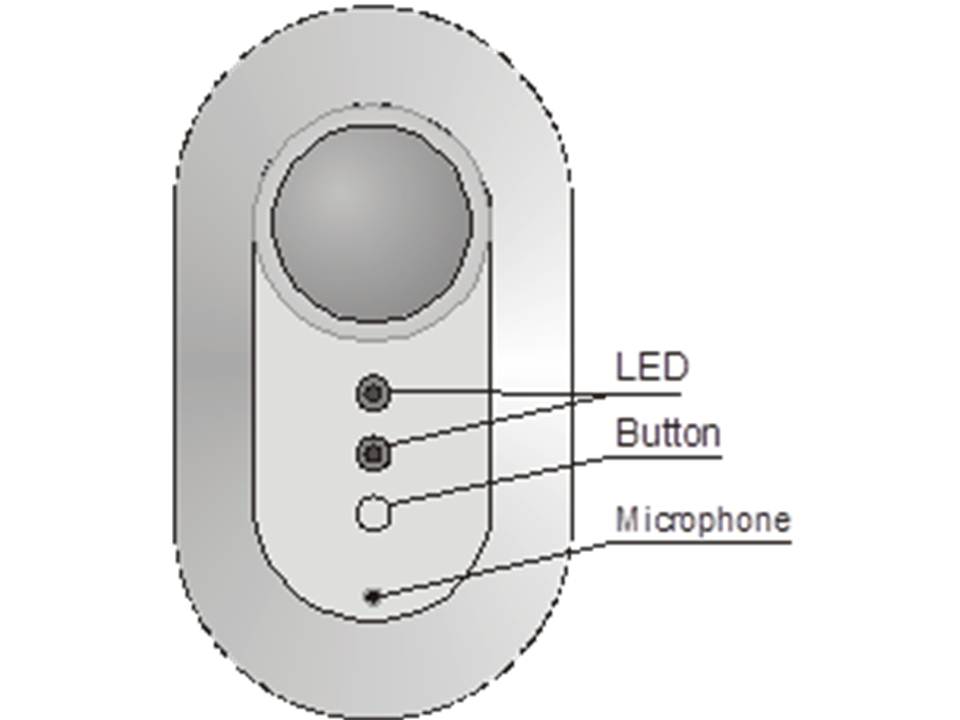
2 Authorized phone numbers
SP-02 full operation is possible only with authorized phone numbers - These must be programmed before using the device for the first time. The telephone line must support caller identification (CLIP). Jablotron GSM communicators work automatically for this function (except for calling phones with withheld numbers).
- From any phone, you can make a call to the SP-02's its phone number (the number of the SP-02's line is now connected). Once the red light starts flashing press the button to answer the call.
- Set programming instructions on your phone (sequences) according to the table below.
- Successful programming is indicated by 1 beep and incorrect programming is indicated by 4 beeps.
- End the call and test the device's functions
| Sequence | Function |
| ** | To store a current phone number in memory number 1 |
| *Dxxxxxxxx* | Phone number memory storage (7 to 22 digits), D is the phone number memory reference (1 8) The SP-02 automatically answers calls from the stored phone numbers. |
| *D* | To delete a phone number in memory D |
| *9xxxx* | Setting the access code (4 digits) and locking the SP-02 Program at least 1 phone number first! |
| #xxxx | Unblock the SP-02, xxxx is a valid access code |
Notes:
Programming is only possible when the device is reset or unlocked. If the access code is set, the SP-02 is automatically locked. To reactivate the SP-02, it must first be unlocked. If the SP-02 is locked, unauthorized calls will not be answered by pressing the button on the SP-02. If there is a malfunction (e.g. because of a dead battery) you will hear 10 beeps.
Warning: If the SP-02 is locked and no phone numbers are stored, further communication is impossible. In such a case, a reset of the SP-02 must be performed. This also applies if you have forgotten the access code.
3 Listening and calling
The intercom automatically accepts incoming calls from up to 8 set (preset) phone numbers (see the setting table). Successful connection of the communication is confirmed to the caller by a long beep. The green LED starts flashing on the SP-02 indicating that the microphone is turned on (listening in the premises). An incoming call from an unauthorized phone number is indicated by the flashing red LED. If the SP-02 is not locked, it is possible to answer the call by briefly pressing the button.
By briefly pressing the button, the SP-02 will forward an alarm call to the telephone number which is stored first in the memory. After the confirmation of a long beep, the functions are the same as in the case of an incoming telephone call.
The caller's telephone keypad can be used to control communication:
| Key/ sequence | Function | Indicated by |
| 1 | Switch: microphone - listening (switching) speaker - talking | Green LED Red LED |
| 2 | Switch microphone on - listening and switch speaker off | Green LED |
| 5 | Turn speaker on - talk and turn microphone off | Red LED |
| 0 | End the call | Green LED flashing |
| #xxxx | Unlock the SP-02 (xxxx is a valid access code) | Beep |
Notes:
If the SP-02 is not locked, briefly pressing the button has the same function as key 1 on the phone. So it is also possible to change the direction (listening/speaking) of the communication and end it. Only the caller can end the call by pressing the key 0 or by hanging up the phone. The call is also automatically terminated 5 minutes after the last call (pressing a key).
During the test it is recommended to keep some distance between the SP-02 and the phone, otherwise you may hear unpleasant audio feedback. Pressing the 3, 4, 6, 7, 8 or 9 key will mute the communication. Communication can be restored again by pressing any keys (1,2,5).
4 Reset
A reset can be performed by pressing and holding the button on the SP-02 while inserting the batteries (hold the button until the red light stops flashing). This resets the factory settings back to the device. (all phone numbers are erased) and unlocks it.
5 Specification
| Power supply | 2x alkaline batteries AA 1.5V |
| Max. number of stored phone numbers | 8 |
| Analog interface | ETS 300 001, EN 301 437, TBR 21 EMC EN 50130-4, EN 55022 |
| Safety | EN 60950-1 |